17 May 2013

Google Plus - New layout and features unveiled at #io13

When I clicked onto Google Plus earlier on today my first reaction was 'OH, That's different!' The 'news feed' as you would call it has had a major makeover and now looks like Facebook and Pinterest's shiny new love child. 

The first thing you notice is definitely the appearance of the 'news feed' area [Sorry Zuck,  but I'm probably just going to call it this from now on] but this new roll-out apparently has "41 new features for Google Plus, the most important being related to design, messaging, and photo sharing."


New Google plus layout


Now, at this point I need to say that although I've had a Google plus account for the past couple of years,  it's not something I'm particularly enamored with. I think one of the reasons behind this is the fact that none of my friends really have it, or if they do they seldom use it. A current report from Google suggests they have 190 million active users, and around 390 million who have partly upgraded to it's services....but I'm certainly not pals with any of them! I can appreciate that it has some really cool features like hangouts and events but it's kind of like being at the best party in the world....all by yourself - not much fun! Another couple of things annoy me. For one the 'cover image' at the top is wayyyyy to big, and I don't think I'll ever quite get used to categorising people into circles ..it all feels a bit kumbaya. Sometimes you just know people because you know them, and it feels a bit proper to call them an 'acquaintance'.

Apart from those couple of bug-bears I've been persisting with Google Plus and posting on it occasionaly over the past two years. I mostly use it to link to my blog posts as Blogger gives you the option to post these automatically and I read somewhere that the Google search engine gets particularly excited by these links and will list these higher in search listings. 

New Google Plus photo feature layout


I'm not going to list all of the new Google Plus features as I probably won't give it justice. So, I'll just talk about a couple of things that have caught my eye. 

  • As mentioned before I think the new multi-column layout is a big improvement and a lot more interesting to look at, even if it is a bit of a Facebook rip off. 
  • I also quite like the little 'mini profile' that hovers up when you roll over someones profile name. 
  • GIF's/animations can play straight from within the news feed. Awesome.
  • The new photo page is also pretty cool. It seems to pull photos into albums automatically depending on where they came from, or what they are about. 

However, I don't like:
  • The grey background and pure white colour scheme is just a bit too minimalistic and is a bit of a snooze-fest.
  • I STILL can't find the 'edit profile' button easily, am I missing something?!

Do you use Google Plus? What are your thoughts on the new layout and features?

Thanks for reading! Melissa.

Coincidentally, you can add me to your circles here > Melissa on Google 

If you liked this post, then please feel free to share it - 


Sources:
http://www.android.gs/google-plus-has-new-looks-automatic-hastags-and-photo-editing-options/

http://slashdot.org/topic/bi/google-bets-analytics-will-boost-google-fortunes/


13 May 2013

Improve productivity & well-being in the digital work place!


Woman using mouse at computer desk

Working in the creative/digital industry in this day and age probably means that you spend quite a lot of your time sitting at a computer, tapping away on a phone or swiping on a tablet - at work and during your free time. Almost gone are the days when you'd get out and about for a meeting at work, or go out for a meal at the weekend without instragramming your macaroni cheese. Nowadays emails, calls, video chats, social networking and instant messaging have taken over. Most people probably find that once they've finished work and have plonked themselves down on the train home they head straight to their personal Facebook/Twitter/MyCatster to check out the latest happenings - I'm definitely guilty of this!

While we were at risk of getting 'square eyes' from watching too much TV when we were younger I wonder if we're now as risk of getting '1136-by-640px eyes'...or stylus shaped thumbs - eek!

In the office I tend to find it hard sitting in the one place for hours on end, unless I really am 'in the zone' when I don't notice time going by. This harks back to uni days when I could sit on Photoshop for hours working on a project and look up about 4 hours later and think 'Jeesh, is that the time?!'  

Thinking about the points above, I've been chastising myself recently for spending too much time online and have found myself making rash resolutions to delete my Facebook profile, chuck my laptop out the window and go live in a organic tree village........only to want to want to pronounce my new-found philosophy to the world via a tweet (dangit!)

Whilst I might not be changing my name to Sun-Beam Daisy-Love any time soon I've started trying to do a few things to save my retinas and general sanity which you 'digital folks' can do as well to help break up your working day, improve your general 'office health' and even increase your productivity. Some of them might be obvious but a few are definitely useful...


Stay healthy 9 till 5...

Sit up straight - It's the age old piece of advice but it really will make a difference to your back if you sit with your back against the back of your chair with your feet on the ground....not to mention stopping you having a posture akin to Golum in later life. 

H2OH! - Drink plenty of water throughout the day but if you have a big bottle only fill it up partly as this will give you an excuse to get up, stretch your legs and re-fill. 

Twinkle toes - Rock your feet back and forth (toe to heel), move up and down as if you're walking to keep your circulation going. 

Step away from the screen - Sometimes it might be hard but try to take lunch break and get out and about. Even if you eat your lunch at your desk then try to take a 10 minute walk around, or just go for a mosey around your office. 

Snack time - As well as having a proper breakfast try and have some healthy snacks throughout the day - things like fruit, yoghurt, nuts. 

Take a break - Try and take time away from screens. On the train home try reading a book or just listening to some music for a while. Turn off your phone an hour or so before bed so you're not lying reading tweets right before getting some shut eye. 


Row of dark grey computers in a line


Improve productivity...

Get it out the way - If there's something on your mind that you want to do online, like buy THAT pair of shoes, or get tickets to the gig that have just went on sale then you're best to do it in the morning before starting your actual work. This way it gets it off your mind and will allow you to focus your attention on your work. 

Make lists - I have to say, I love a good list. I normally have a big 'weekly' to do list, and then each morning I split that into things I 'want to do today'. Doing this allows you to have a clear view of what you need to achieve each day and will help you prioritise tasks. It's a good idea to create a list for the week ahead on a Friday before 5pm - meaning you can come in on Monday morning and know what you have to do right away instead of trying to clear away the weekend cobwebs and trying to remember where you left off...

Reward yourself - Another good thing about making lists (above) is that you can reward yourself when you complete a task. This can be anything from getting can of juice to listening to a song...all these wee things will make you feel a sense of achievement and a feeling of "Right!, what's next?"


Keep all your ideas - Sometimes ideas for work or other projects can hit you at the most random times - just nodding off, getting your lunch, walking the dog...It's a good idea to have somewhere to keep these ideas which is more substantial than a piece of paper so I usually send myself quick emails with a couple of lines of text. You can also use the 'notes' or 'memo' feature on your phone to jot down thoughts quickly. 

Do you have any other tips for improving productivity or working tips in general - comment below!

Thanks for reading, Melissa x


Melissa on Twitter

3 May 2013

15 things you should be doing to drive traffic to your blog!


I'm fairly new to the world of blogging, but even during my short stint writing blog posts for my creative blog: The Creative Frontier and my beauty blog: Beauty and the Bargain, I've discovered a few tricks of the trade that can help boost your page views dramatically. 

I'm certainly no expert and I'll admit I still haven't quite yet cracked how to get more followers via the 'Google friend connect' feature. If you've got any tips on this please feel free to 'share the wealth' and comment below! But as for now I'm happy just writing away to build my experience and hoping that it'll come in useful the next time I'm applying for a job!

Anyway, if you're writing a blog and want to help more people read it then here are some methods that I've been using recently...

1 Get social!
As well as linking to your blog on your Facebook and Twitter bios you should post links to all of your new blog posts on your personal channels. If you want to go one step further you could set up a 'fan page' for your blog on Facebook, and similarly a dedicated Twitter account. Depending on what you're writing about use popular hashtags to help get your content noticed, for example, beauty bloggers commonly use #bbloggers when linking to their posts. 

2 Contact influencers
Following on from the point above, you should try and get your blog posts noticed by 'influencers'. By this I mean that getting RT's, replies, shares or comments from influential people who are in some way connected to the theme or content of your blog. For example, if you're a beauty blogger and you write a review of a Revlon lipstick....@mention Revlon on twitter telling them about it and hopefully you'll get a RT to thousands of other fans who like Revlon. (good PR for them and exposure for you) 

3 Use Linkedin
If like me you're writing a blog to help boost your writing skills to improve your job prospects then it makes sense to encourage your Linkedin connections to view your blog. You can mention it within your actual personal profile and also post updates, much like a Facebook 'status'. Just recently you can @mention 'companies and connections', which would be useful if you had written a blog post about a certain company, person or if you just wanted to notify someone in particular about the post. 

4 Use Google+ features
As blogger.com is a Google platform it 'likes' it if you use Google features and other platforms, and I've certainly seen a rise in my page views since I've started using these techniques:
  • Automatically share your posts on your Google+ page (make sure they are set to share with the public)
  • @mention people or companies directly within blog posts
  • Enable 'Google+' comments on your blog posts
  • Search for and add other bloggers into your 'Circles' 
  • Join or even create relevant Google+ communities
  • Use the 'Google friend connect' feature to follow other bloggers and encourage others to follow you

5 Keep search engines 'in-the-know' 
Every time you post on your blog submit the link to http://pingomatic.com/ which is a free service that tells search engines that your site has been updated. 

6 Submit links to Reddit
One of the sites that drives the most traffic to my blog is http://en.reddit.com/. Create an account and sumbit a link to every new blog post you write, tagging in under the right group to make sure it gets noticed. Most of mine go under Graphic Design, Social Media or Marketing. 

7 Get Bloglovin followers 
This site is a tool for publishing your blog posts and following other blogs. It seems to be most popular with beauty and fashion blogs but it could still be worthwhile to create some more inbound links to your blog which will increase it's credibility to search engines. Once you've made an account you can add a badge to your blog sidebar to encourage people to follow you on Bloglovin. You can also link your profile with your personal Facebook page so it automatically posts your latests blogs. 

8 Use good photos and ALT tags
Be sure to include at least one image in all of your blog posts as not only will it help it look more interesting it will pull through as a preview when you link to the post and encourage potential readers to click through. Also, remember to include descriptive ALT tags for images for accessibility and to increase the chance of the image being found through a search engine. 

9 Choose the right 'labels' 
Remember to use labels to categorise your blog posts. They can be shown at the bottom of your posts and users can click through if they see a word, or label they are interested in . You can also use them in your sidebar as a menu by showing how many posts you have per label. 

10 Run a competition
From what I've seen a sure fire way to promote your blog is by running a competition on it through a service such as http://www.rafflecopter.com/. You can encourage people to enter through a number of methods such as following you on Twitter, sharing your blog link, liking you on Facebook etc...I think I might try it out soon on my beauty blog, but I'm not sure what I'd give away here on The Creative Frontier hmm!

11 Become (or invite) a guest blogger
A great way to drive traffic to your blog is to write a 'guest blog' on another persons blog where you can include a link back to your own blog. You could also check out your local publications, newspapers and websites to see if you could write an article for them which could also include a link to your blog (I did this recently with lanark.co.uk)

12 Pay to advertise on other blogs
If you've got some dough to spend you could pay to advertise on other popular blogs through the form of a button or graphic. I'm not sure if there is an official process for this as from what I've seen some bloggers simply post asking 'who wants to advertise on my blog' and presumably people get in touch and pay £x per month to have a graphic or link in their sidebar.

13 Comment on other blogs and leave your link
Blogging is all about building a network so it's essential to check out other blogs within your industry - not only will you be able to see what other people are doing you'll be able to pick up some useful tips! When leaving comments on other peoples blog posts be sure to make them meaningful, not just 'hey check out my blog [link]' - by all means leave a link to your blog but try to read the blog post properly and comment sincerely. 

14 Be relevant!
Blog posts are going to get picked up and noticed if you talk about something relevant. This might be to do with current affairs, new inventions/technology, new products (especially relevant in the beauty industry) or recent events. Of course the problem is that everyone might have this view and your post about the "new Facebook layout" might get lost within a barrage of other similar ones - that's why you've got to do something to put your own twist on it and get your own opinion across. 

15 Give your post a good title
Although you shouldn't judge a book by it's cover, many of us are probably guilty of judging a blog post by it's title! Try to include important keywords from your blog post in it's title as these will catch peoples eye when they see any links to the post. Human beings are naturally curious so it also helps to make post titles intriguing  to make people feel as if they are missing out if they don't read it. Some examples of title formats could be...

  • How to...
  • 4 ways to...
  • The top 10...
  • The best way...
  • The worst things about...
  • What you shouldn't be doing...


Thanks for reading, as I said I've just started blogging so am by no means an expert but I hope you found some of the tips useful! 

Please feel free to comment below...you can even leave your link ;)

21 April 2013

My latest venture is ....Croodle: A social networking site for creative graduates based in Scotland!


www.croodle.co.uk

I thought I'd tell you a little bit about my latest venture 'Croodle'. In essence it's going to be a social networking site for creative industry graduates based in Scotland - to be used by graduates as well as employers. 

Graduates will be able to create a profile with details about themselves and upload some images of their work. They'll then be able to chat in industry specific forums about portfolio/CV tips/their industries and anything else that takes their fancy....They'll also be able to join and search job 'groups' where admin will post links to the latest jobs (and employers will also be able to post opportunities directly here)

As I said before employers will be able to create a profile and post any opportunities or jobs they have in 'groups' relating to their industry (paid/unpaid/voluntary etc). They'll also be able to join in forum conversations and contact any graduates directly who catch their eye. 

Another main aspect of 'Croodle' is the blog where every week/month (still need to clarify dates!) we'll have a guest blogger which could be an employer giving graduates tips on how to improve their portfolio, or a successful graduate telling us how they landed their dream job. (get in touch if you fancy writing a blog for us). Bloggers can include as many links as they want to their work, online portfolios etc so it's a great way to get noticed! 

The idea for 'Croodle' came about in the middle of last year when I was thinking about the time just after I had graduated from Glasgow Caledonian University with a 1st in Applied Graphics Technology...and the trouble I had trying to find a job (which was actually relevant to my course) and how this experience could have been improved. I think one of the main reasons for the my struggle (and I'm sure the struggle of many others) was that there was no place online where graduates could be directly connected to industry employers. I think this is especially true for graduates living in Scotland, as I remember scouring job sites with 1,000+ creative jobs only to be hit with '0 results match your search' when putting in Scotland as the desired location - although I'm sure this isn't the case. It wasn't the problem of not 'looking in the right place', but one of the 'place' not existing!  Croodle aims to be a place where graduates can form a community to share their knowledge, experiences and opportunities and also a place where employers can connect directly to the people looking to work with them. 

I'm hoping to launch Croodle in May/June this year and although there may be a few teething problems I hope people will bear with me! :)

If you'd like to hear more about Croodle, would like to write a guest blog (as a graduate or employer) or would like to chat then email hello@croodle.co.uk


Follow Croodle on Twitter @Croodle_tweets

Join Croodle on Facebook

Check out the Croodle website and join our mailing list!


5 April 2013

Recent design work and MOO business cards

I thought I'd give you an update on some of my latest freelance design work. The last project I worked on was 'Pete's Photo Adventure' - which required a logo design, CMS website and business cards produced. 

Pete is a photographer based in Lanark and I think some of his shots are great (maybe I'm biased!) ...no, they really are. You can check some of them out on his website: http://www.petesphotoadventure.co.uk/


The logo was designed to convey elements of photography in a simple and easily recognisable format. The bold and capitalised text was used to convey a sense of adventure and is reminiscent of photography magazine features. The logo also works well as a silhouette and watermark which is perfect for using over photographs as copyright. 


Petes photo adventure website

Petes photo adventure website

Petes photo adventure website

 The website is built on the Wordpress CMS platform so Pete can upload his own photos, write blog posts about his 'photo adventure' and make other small amendments. The colour scheme is subtle but classic and I think the grey/black gradient background really make the logo pop, and the colours in the photographs stand out. Pete is also very active on Facebook, Twitter and Flickr so there is social media integration throughout the site with live feeds and the ability for users to 'share' individual photos. 


The front of Pete's business cards are bold and simple - conveying all the relevant information. However, using the magic of Moo.com the back of the business cards come to life with some of Pete's best photography - allowing potential clients 


I'm available to take on design work just now - anything from flyers to social media support. Get in touch > melissa@247-design.co.uk

My website > 247-design.co.uk

My Facebook page > 247 Digital Design

Thanks for reading!x


29 March 2013

Video editing for Oliver!

I thought I'd do a quick post to show you a little video I pulled together to promote Lanark Amateur Musical Society's latest production of Oliver! 

At our last rehearsal I filmed some shots of practice and got some members of the cast to talk to the camera about the show, the part they are playing and to try and encourage people to come and see the production!

My trial of Premiere Pro ran out so I had to find another free video editor to use. After scouring around I found the AVS Video Editor which was reasonably easy to use.

If you're in the Carluke area and would like to come and see the show you can call 07771726438 for tickets.

9th - 13th of April
Carluke Lifetyles
Adults £11, Concessions £8
7.30pm (3pm Saturday) 


11 March 2013

Font-tastic: Some great font downloads!

Sometimes the difference between a good design and a great design is the font used to display text...Just imagine the Nike logo in Comic-Sans or Papyrus and you get the picture.

I was in 2nd year at University (cringe!) when I discovered that you could download fonts from the internet and worked out how to install them onto my laptop (wee bit about that later in case you've not tried it yet) The website I use the most now to download fonts for design projects is DaFont.com which I find to have a really varied selection of fonts which are categorised well so that when you don't know exactly what you're looking for you can usually gain some inspiration by searching around. I also discovered the Lost Type Co which provides quality + unique fonts and allows you to 'name your price' and donate anything you like to the creator and have downloaded some fantastic fonts from them recently. 

I've compiled a list of some of the best (mostly) free fonts from these two sites that you can use to jazz up any of your design work. Let me know about any fonts you love to use!


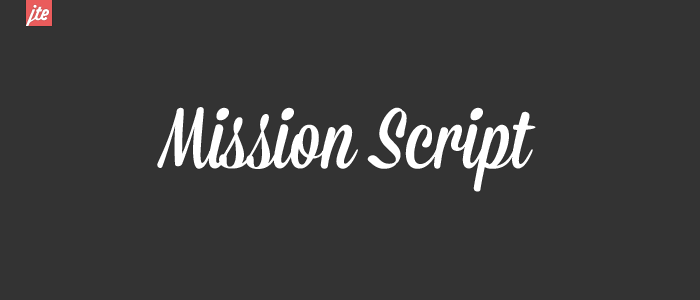
Lost Type Co - Mission Script (works well against block colours)


DaFont- Boris Black Bloxx (good for headline text - not too formal)


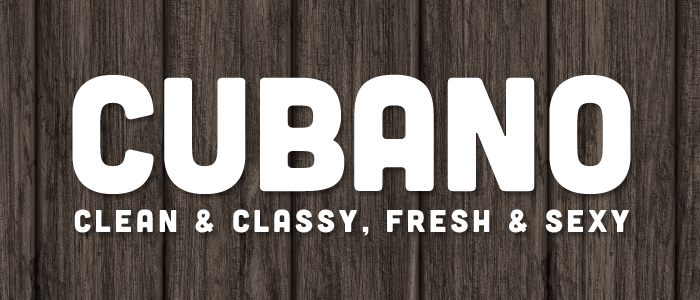
LostTypeCo - Cubano (also good for headline text)


DaFont- Hand of Sean (good handwriting text which is still legible) 


DaFont- A love of thunder (great bold + grungey font)


DaFont- Antipasto (slick and sophisticated) 


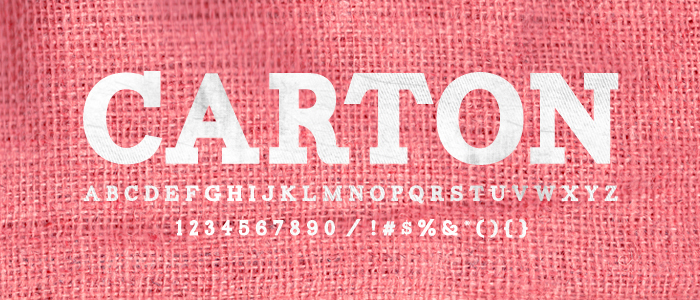
Lost Type Co - Carton (a great feature font)


Installing fonts

1. Download the font by clicking 'Download', 'Save' - this will vary per site. This will download a zipped folder to your set location.

2. Right click or Open the folder and select 'Extract all files'

3. You'll see a list of files but you want the one that is 'yourfontname.ttf' 

4. Right click and copy this file.

5. Go to start > control panel > fonts

6. Right click and select 'paste' and say yes to any permission pop ups.

7. That should be your font installed, you can check by going into a publishing programme such as Microsoft word and scrolling down the font drop down menu until you see your font.

Thanks for reading, please feel free to leave a comment :) (or even 'follow' this blog!)

Related Posts Plugin for WordPress, Blogger...